

How to Find WOSB Government Contracts: A 2026 Guide
Nov 23, 2026 · 11 min read

Search SAM.gov for women-owned opportunities. That's the advice nearly every guide gives, and it's the reason so many women-owned firms spend a month reading notices they were never eligible for.
A WOSB set-aside isn't a keyword. It's a decision a contracting officer makes when a requirement sits under a NAICS code that appears on SBA's eligible-industry list and the officer expects offers from certified firms. Plenty of reservable work never uses the word women in its title, and plenty of notices that do use it are closed to you because your size standard or certification category doesn't line up.
So the practical order for how to find WOSB government contracts runs the other way. Clear the eligibility gates, match your codes to SBA's list, then search, then test the award route, then screen the notice. Do the last two steps before you invest an hour of proposal time.
Table of Contents
- Confirm Your Eligibility Before You Search
- Match Your NAICS Codes to WOSB Eligible Industries
- Search SAM.gov for WOSB Set-Asides Step by Step
- Read the Award Route Before You Invest Time
- Screen Each Solicitation for Set-Aside Red Flags
- Track Bids and Run the Weekly Review
Confirm Your Eligibility Before You Search
A WOSB set-aside notice is only worth opening if your company can legally compete for it. Run the gate test first, and don't touch a search filter until every row reads yes.
The SBA's contracting guide sets the sequence: federal business opportunities are listed on SAM.gov, some are reserved for socioeconomic categories including certified WOSBs, and the program is limited to eligible industries. That same guidance records the changes that make a lot of older advice stale. The eligible list grew from 444 industries to 759 in March 2022, a 70% increase, and since October 15, 2020, firms seeking WOSB or EDWOSB set-asides can no longer rely on the former self-certification process through certify.sba.gov.
Two prerequisites sit in front of everything else. An active SAM.gov registration with a Unique Entity ID. And an approved WOSB or EDWOSB certification through MySBA Certifications, not a self-certification filed years ago.
| Gate | What to verify | Where to check |
|---|---|---|
| Active SAM.gov registration | Current registration with a Unique Entity ID | SAM.gov |
| WOSB or EDWOSB certification | Approved SBA certification, not a self-certification | MySBA Certifications |
| Size under the NAICS standard | Company is small under the solicitation's size standard | SBA size standards and your revenue or headcount records |
| Ownership and control | At least 51% owned and controlled by U.S.-citizen women | Operating agreement and stock records |
| Day-to-day management | Women manage daily operations and make long-term decisions | Organization chart and management records |
| Industry eligibility | Your NAICS codes appear on SBA's eligible-industry list | SBA eligible-industry list |
Ownership is the gate people confuse with the whole test. Women own more than 12 million businesses and employ over 10.7 million workers, according to SBA's Office of Advocacy. Ownership that broad clears exactly one row. It says nothing about your size under a particular solicitation's NAICS standard, nothing about whether women run the operation day to day, and nothing about whether your industry is on the list.
That last row catches many firms. A firm can be certified, correctly owned, well managed, and still find no set-aside work because its code sits outside the eligible list.
The gate test: if any row reads no, the search can wait. Eligibility first, filters second.
If registration itself is still ahead of you, the order from entity setup to first bid is covered in this walkthrough of how to get government contracts for small business.
Match Your NAICS Codes to WOSB Eligible Industries
The word women-owned is not the filter. The NAICS code is.
Search by keyword and you get both kinds of error at once: notices you can't touch, and silence where real set-aside work exists. A procurement can be reserved for WOSBs under an eligible code with no WOSB language anywhere in the title. A notice that shouts women-owned can be closed to you because your code, your size, or your certification category doesn't match.
SBA limits the program to designated industries, and the solicitation's assigned code decides whether a WOSB or EDWOSB set-aside is even possible (SBA's eligible-NAICS list). SBA's current list identifies 733 industries: 626 where WOSB Program participants can compete, and 107 limited to SBA-certified Economically Disadvantaged WOSBs.
The market behind those numbers is large. In its fiscal year 2022 procurement announcement, the SBA reported that more than 92% of federal spending was covered by NAICS codes eligible for WOSB set-aside awards, and that awards made specifically through WOSB set-asides reached $1.56 billion, a 17% increase from the prior year (SBA's record small-business procurement announcement). Eligible industries aren't a niche. Your code probably appears somewhere on that list. What varies is which live notice carries your code, and a keyword can't answer that.
A three-step code check
- List your codes accurately. Primary first, then every secondary code you can support with past work, staff, and equipment. A code you've never been paid under is a code you'll struggle to defend in a bid.
- Mark them against the live list. SBA revises the list, so work from the current version rather than a count you found in an old article. Keep a copy of the marked list with the date on it.
- Search only with marked codes. Each query stays clean, and every result is at least possible. Codes outside the list give you nothing that a set-aside search can use.
A code on the list means the industry can carry a set-aside. It doesn't mean a specific notice is set aside, and it doesn't make you small under that solicitation's size standard. The size half of the test is set out in this guide to NAICS codes and size standards.
Search SAM.gov for WOSB Set-Asides Step by Step
Give the search a fixed order so results match eligibility instead of keywords. SBA's program page lists the fields a working search covers: NAICS, agency, place of performance, set-aside code, response deadline and notice type (SBA's WOSB federal contract program). It also treats certification as a gating control, which puts the search after the certification, never before it.
Here's the sequence I'd set up on day one.
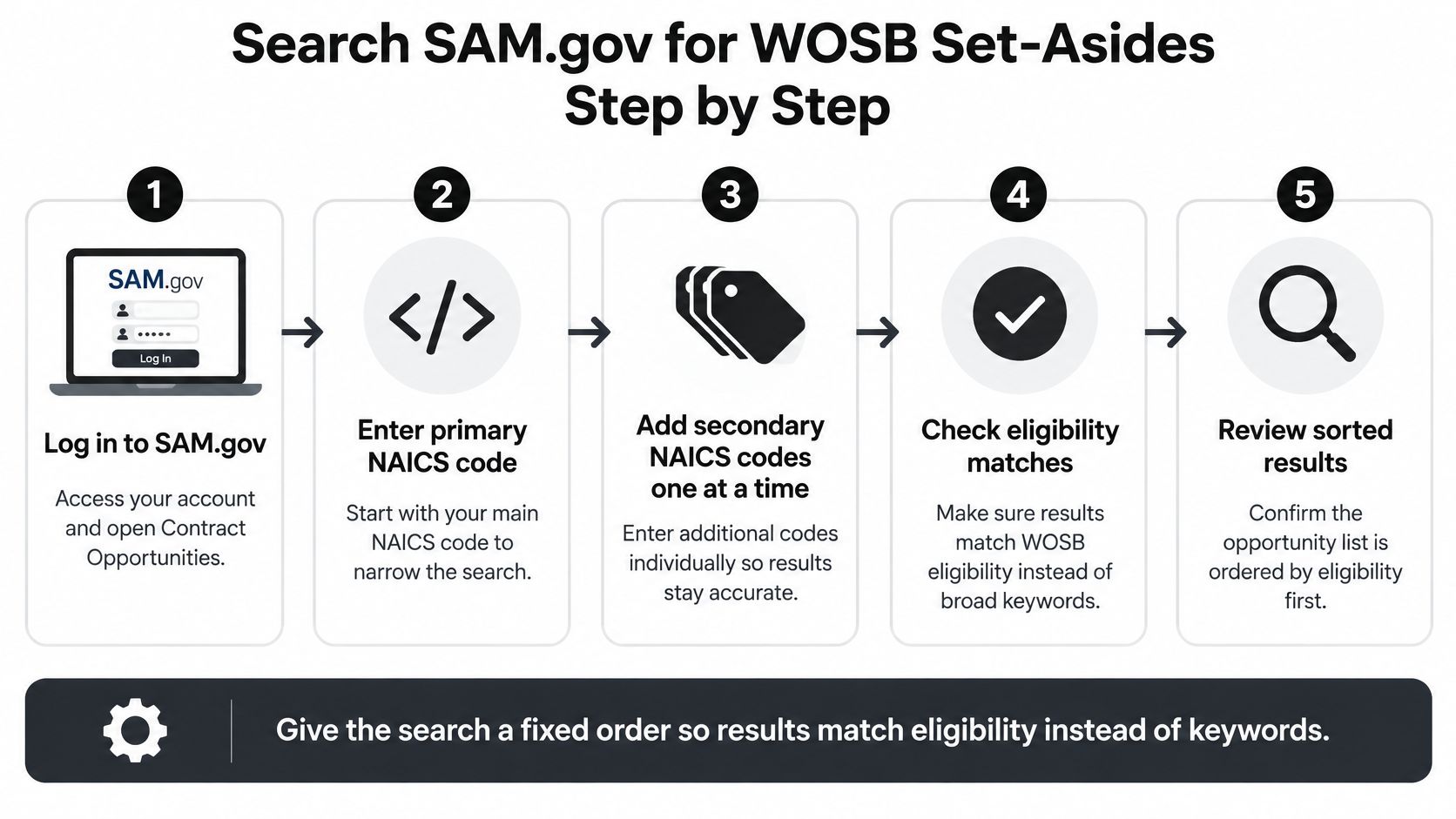
- Log in to SAM.gov and open Contract Opportunities. That's where the notices live, and every open notice has its own public page. Start there rather than from a forwarded link, so you see the attachments and the amendments together.
- Enter your primary NAICS code first, then add secondary codes one at a time. Adding them individually keeps each result set clean and tells you which code produced a hit. Paste in five codes at once and you'll never know which one is doing the work.
- Set the set-aside filter to the designation you hold. WOSB for a standard certification, EDWOSB where you hold the economically disadvantaged certification. Leaving the filter open adds noise without adding eligible notices.
- Narrow by agency, place of performance, and notice type. Solicitation and presolicitation are different animals, and place of performance matters when the work needs people on site rather than a shipping address.
- Sort by response deadline and open each result on its own page. The notice page carries the description, the attachments and any amendment, and it's the version a contracting officer will hold you to.
- Save the search and turn on alerts for amendments. An amendment can change the set-aside, the size standard, or the deadline. A saved search without alerts is a search you'll forget to re-run.
The mechanics are easier to watch once than to read twice.
Search rule: the NAICS filter and the set-aside filter do the heavy lifting. Agency, place and notice type only narrow a list that's already eligible.
Keep those saved searches. They're the raw input for a weekly review that catches amendments before they cost you a bid.
Read the Award Route Before You Invest Time
Finding a WOSB notice is half the question. The other half is the route the agency will use to award it, because the route sets your competition, your ceiling, and sometimes whether the job fits your capacity at all.
Both WOSB routes sit on top of the code question. SBA limits competitive set-asides and sole-source awards to industries it identifies as underrepresented or substantially underrepresented, and the designation differs between WOSB and EDWOSB (SBA's WOSB program). Get the code wrong and the route disappears.
A competitive WOSB set-aside requires the contracting officer to expect at least two responsible WOSB or EDWOSB offerors at a fair market price. When that expectation doesn't exist, the agency can go sole-source, and the ceiling depends on what's being bought (SBA's WOSB program administration guidance).
| Award route | When it applies | Size ceiling |
|---|---|---|
| Competitive WOSB set-aside | Contracting officer expects at least two responsible WOSB or EDWOSB offerors at a fair market price | No sole-source ceiling |
| Sole-source, manufacturing | The competition expectation is not met | $7 million |
| Sole-source, other requirements | The competition expectation is not met | $4.5 million |
Read that table as a capacity test, not a prize. A $7 million manufacturing ceiling doesn't mean a small shop should chase $7 million of work. It means the route allows an award of that size without competition, which changes how much delivery risk lands on one signature.
Two checks tell you which route is realistic before you spend a day on a package. First, pull the likely competitor pool in SBA's Small Business Search for firms holding your NAICS codes. A crowd of qualified WOSBs in your code makes a competitive set-aside likely. A thin pool makes sole-source more plausible, and sole-source is only interesting if the estimated value fits under the ceiling.
Practical rule: if the notice is sole-source and the estimated value sits above the ceiling for that requirement type, it isn't a fit for that route. Move to the next notice.
Second, look at who has held the work. Prior awards show whether the agency buys this requirement on its own or bundles it into something larger, and that shapes whether a set-aside is on the table at all. Ceilings are as stated in SBA guidance and can change, so confirm the current figure in the solicitation and the program rules before you price anything.
Screen Each Solicitation for Set-Aside Red Flags
The red flag that costs the most time isn't fraud or fine print. It's a notice that still reads like an open set-aside but has already moved past that stage.
Titles and set-aside codes lag reality. A requirement can be awarded, canceled, or switched to sole-source while the search result still shows the original designation. None of that shows up in a list. All of it shows up on the notice page and in the amendments.
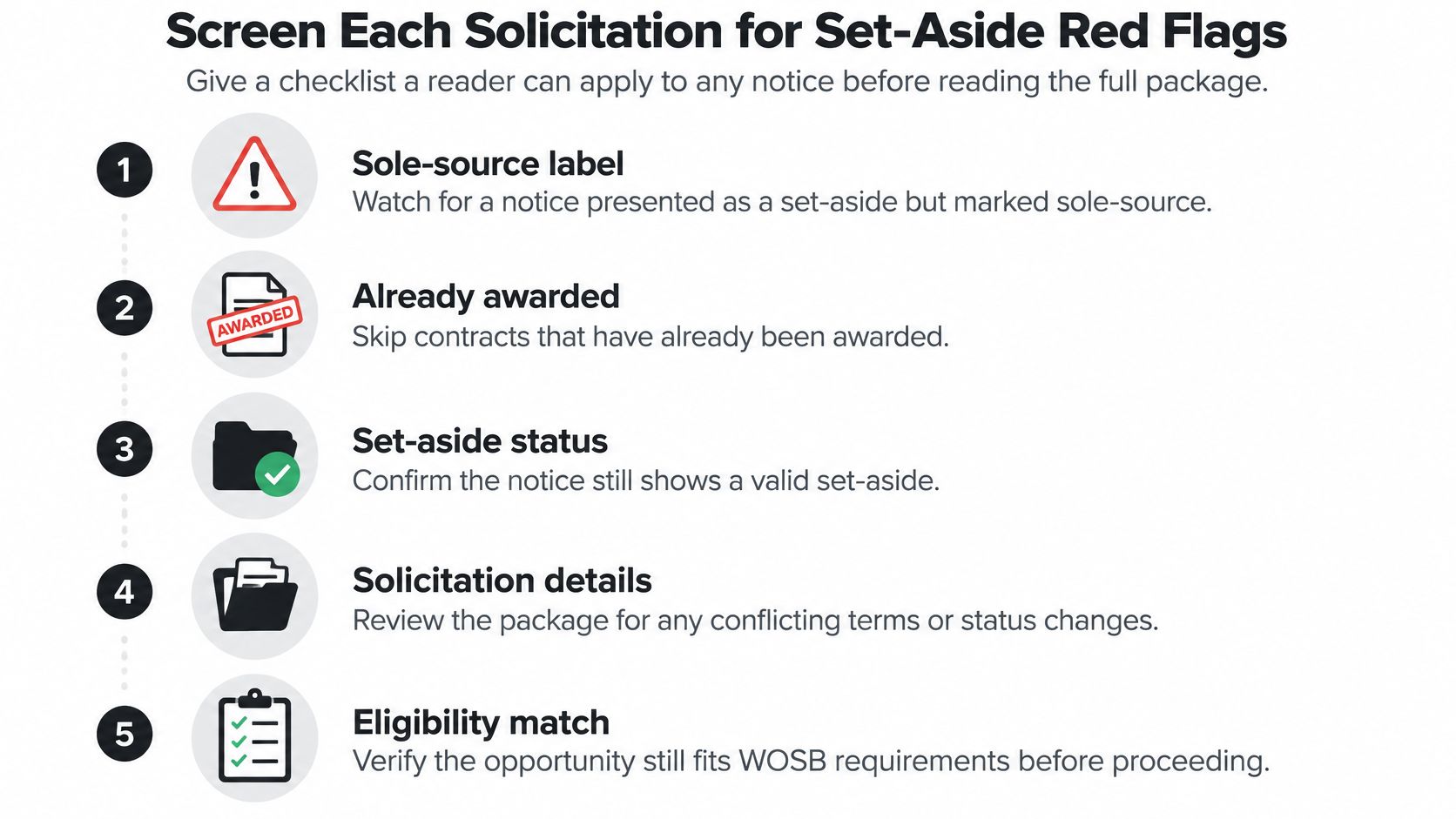
- A sole-source label on a notice you found as a set-aside. Check the award-route table against the estimated value before you read further.
- A contract that's already been awarded. Skip it. Old notices linger because nobody closed them out.
- A response deadline too short for a compliant package. If you can't build the matrix and the past-performance section in the time left, the notice isn't real work this cycle.
- A set-aside code that doesn't match your certification. An EDWOSB-only notice on a standard WOSB certification is a no, however well the scope fits.
- A NAICS code outside your eligible list. This is the one a keyword search hides, and the reason code checks come first.
- A place of performance you can't serve. Read it against where your people are.
- An amendment that changed the set-aside, the size standard, or the deadline. Confirm the deadline in the time zone the solicitation states, not yours.
A label is not evidence of compliance. The SBA Office of Inspector General found noncompliance with federal regulations in 50 of 56 reviewed WOSB sole-source contracts, valued at $52.2 million (SBA OIG report 18-18). That's a reminder that the rules bite in both directions: verify your own certification, ownership and size evidence rather than trusting the notice label, and expect the file to be examined if you win.
Build a requirement-to-evidence matrix for every notice you keep. Every obligation from the solicitation on one side, and the proposal section, page, attachment or named owner that answers it on the other. Mark the gaps rather than assuming you'll close them later. The column layout that survives a real review is set out in how to build a compliance matrix for a government RFP.
Then classify. A notice with an unresolved red flag stays at Maybe until the gap closes. A notice with a clear red flag goes to Skip, with the reason written down so nobody reopens it next week.
Track Bids and Run the Weekly Review
None of this holds together without a fixed slot on the calendar. Put 45 minutes in for the same day each week and work the same five steps in order.
- Open every saved search and review new and amended notices. Write down the date you checked, so you can show the search was complete if the question ever comes up.
- Log each notice as Go, Maybe or Skip with a one-line reason. The reason is the point. "Skip, no past performance in this NAICS" is usable next quarter. A bare skip isn't.
- Run the screening before the writing. For every Go, the red-flag checklist and the requirement-to-evidence matrix come before a single draft paragraph. Drafting first is how a compliant package turns into a rewrite.
- Move each bid through named stages. Watching, Deciding, Writing, Submitted, Won. A bid with no stage is a bid nobody owns between Monday and Friday.
- Set each deadline reminder in the solicitation's time zone. Not yours. A 2 p.m. Eastern deadline is 11 a.m. Pacific, and a Friday deadline means Thursday afternoon for anyone west of it.
Before you draft, re-verify the three things that decide your standing on that specific solicitation: SBA certification status, size under its NAICS standard, and whether the notice calls for WOSB or EDWOSB (SBA certifications). Size is measured per solicitation, so a firm that's small in one code can be other than small in another.
If the weekly review keeps slipping, the problem is usually tracking, not discipline. A plain task tracking guide for busy founders is worth ten minutes, because the bids that die are the ones with no owner and no next action.
BidFunnels handles that part inside the same workflow. Paste a UEI or website and the company profile fills in with NAICS codes and certifications, and each opportunity moves through Watching, Deciding, Writing, Submitted and Won so the Friday review shows what's stuck rather than just what's new.
The first action takes about two minutes. Open Contract Opportunities on SAM.gov, search your primary NAICS code, save the search, and hold the results against the six gates before you open a single notice. Reading the solicitation is still the only way to know whether a notice is real work, because a Go, Maybe or Skip is a quick read of your own rules, not a promise of award.
BidFunnels checks SAM.gov for new and changed notices several times a day and scores each one against your NAICS codes, set-asides, location and time left to respond, so a WOSB-tagged notice that fails your gates shows up as a Skip with the reason attached. Add your company once and the federal WOSB and EDWOSB set-aside notices arrive already filtered, with the solicitation's requirements laid out in one table when you decide to bid. Start with the 7-day Pro trial, no card required, at BidFunnels.